


Never input personal or customer data into Storygenie; use fictional personas instead.

AI-Powered Jira Backlog Generator • Atlassian Marketplace app
Generate Jira Epics & User Stories with AI
From prompt to Jira backlog in minutes: one prompt to dozens of structured Jira epics and user stories. Review, refine, and publish directly to Jira Cloud.
30 day free trial • No credit card • Free for Jira teams of 10 or less
00:00 / --:--
AI-Powered Jira Backlog Generator • Atlassian Marketplace app
Generate Jira Epics & User Stories with AI
From prompt to Jira backlog in minutes: one prompt to dozens of structured Jira epics and user stories. Review, refine, and publish directly to Jira Cloud.
30 day free trial • No credit card • Free for Jira teams of 10 or less
How Storygenie works
Ship faster with AI generated Jira backlogs
Ask for the backlog you need, then tailor it in minutes directly in Jira Cloud.
What does Storygenie do?
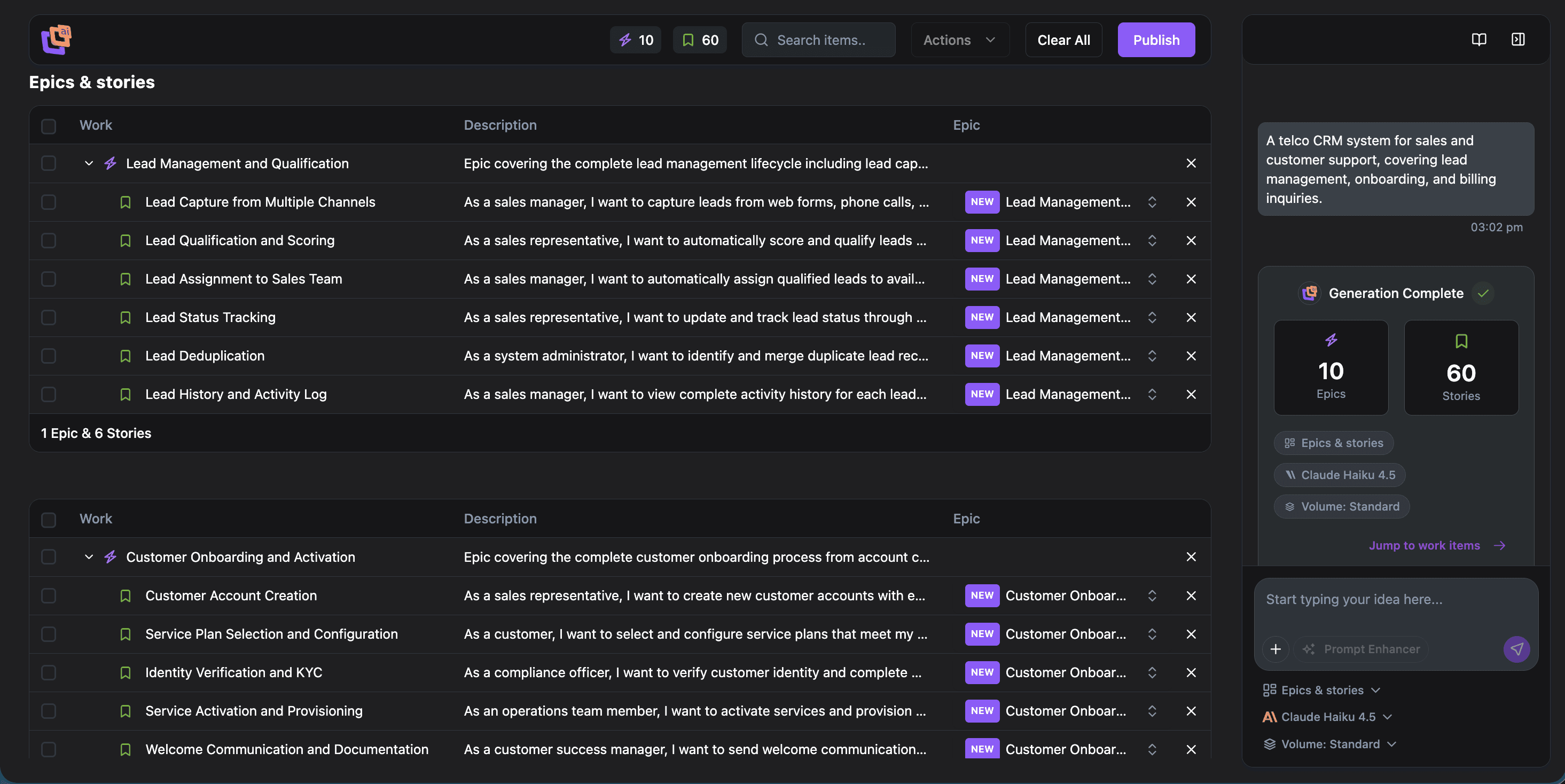
Storygenie is an AI-powered Jira backlog generator. It helps teams generate Jira epics and user stories with AI from a short prompt, then review, edit, and publish directly to Jira Cloud.
Who is it for?
Product owners, BAs, delivery leads, and dev teams that need AI-powered Jira work item creation with consistent structure and acceptance criteria.
How fast is it?
Minutes. Enter a prompt and Storygenie generates dozens of structured Jira epics and user stories, complete with acceptance criteria, ready to review before publishing to Jira.
Outcome → From a single prompt to a publishable Jira backlog in minutes: less writing, faster planning, and smoother shipping.
1
Launch Storygenie
Install the Atlassian Marketplace app, open Storygenie in Jira Cloud, and start a new AI-powered Jira backlog generation session.
2
Select Work Item
Choose the Jira work items you need: single or multiple epics, stories, or a full backlog from one prompt.
3
Generate Work Items
Enter your scope prompt and optionally use the AI prompt enhancer. Storygenie bulk-generates Jira epics and user stories with consistent structure and acceptance criteria.
4
Refine & Publish
Review before publishing to Jira: preview, edit, and map stories to existing epics, then publish directly to Jira Cloud with one click.
Storygenie — AI-Generated Jira User Stories & Backlog Manager
Features
Everything you need to ship faster
From a single prompt to a structured Jira backlog — epics, stories, and acceptance criteria, generated in minutes.
Backlog
In Progress
Done
Generate a full project
Generate epics with tasks
Create several epics at once
Generate one detailed epic
One epic with related stories
Generate a full project
Generate epics with tasks
Create several epics at once
Generate one detailed epic
One epic with related stories
Generate a full project
Generate epics with tasks
Create several epics at once
Generate one detailed epic
One epic with related stories
Generate a full project
Generate epics with tasks
Create several epics at once
Generate one detailed epic
One epic with related stories
Generate multiple stories
Create one focused story
One epic with related tasks
Generate multiple tasks
Create one focused task
Generate multiple stories
Create one focused story
One epic with related tasks
Generate multiple tasks
Create one focused task
Generate multiple stories
Create one focused story
One epic with related tasks
Generate multiple tasks
Create one focused task
Generate multiple stories
Create one focused story
One epic with related tasks
Generate multiple tasks
Create one focused task
Creating…
Bulk-generate your Jira backlog with AI
Install Storygenie from the Atlassian Marketplace and generate Jira epics and user stories with AI, going from a single prompt to a complete Jira backlog with acceptance criteria in minutes.
No credit card • Cancel anytime
Pricing that scales with your team
Our pricing model has been desiged to cater for teams of all sizes and to minimise friction of adoption. Teams of 10 and under pay a flat monthly rate with a USD 0.01/month minimum. Choose your preferred billing frequency and team size below to see your price.
Why choose Storygenie?
AI-powered Jira story generation
Transform bullet points and shorthand notes into structured Jira epics and user stories with AI-powered Jira work item creation.
Faster Jira backlog creation
Bulk backlog generation for Jira frees time for strategy and priority refinement while Storygenie handles heavy drafting.
Consistent Jira stories with AI quality
Keep formatting, acceptance criteria, and narrative quality consistent across your Jira backlog with repeatable AI generation.
From vision to Jira backlog
Go from discovery notes to a review-ready Jira backlog quickly, with clear links between customer intent and delivery detail.
$4.95/month USD
USD 0.45 per user (average)
- Atlassian Marketplace app
- AI prompt enhancer
- Bulk Jira epics and user story generation
Built for every role
Alignment from product vision to delivery execution.
Product Owners
Define requirements and prioritize features using AI-generated Jira epics and user stories as your starting point.
Development Teams
Gain clear Jira stories and acceptance criteria generated with AI, then review before publishing to Jira Cloud for consistent delivery.
Business Analysts
Translate business processes and stakeholder needs into structured Jira epics and stories ready for sprint planning.
Entrepreneurs
Rapidly shape product narratives by generating a complete Jira backlog from a single prompt and iterating quickly.
How Storygenie Compares
Compare Jira AI options for bulk backlog generation
Buyers evaluating AI tools usually compare ChatGPT, Jira AI, template add-ons, and Storygenie. This view focuses on real decision criteria for generating Jira epics and user stories with AI.
| Metric | ChatGPT / Claude / Gemini General-purpose AI assistants | Jira AI Atlassian Intelligence features | Story template add-ons Template-driven Jira apps | Storygenie Jira-native AI backlog generator |
|---|---|---|---|---|
| Jira-native workflow | No. Copy/paste required | Yes. Built into Jira | Yes. Marketplace apps | Yes. Marketplace Forge app |
| Bulk epic + story generation | Limited, manual batching | Mostly single-item generation | Template scaffolding only | Full backlog from one prompt |
| Acceptance criteria quality | Variable format and consistency | Basic suggestions | Manual authoring required | AI-generated and consistent |
| Review before publishing to Jira | Outside Jira | Limited in-flow control | Not an AI review workflow | Preview, edit, then publish |
| AI prompt enhancer | N/A | No guided enhancement | Not available | Built-in guided enhancer |
| ADF formatting for Jira | Plain text output | Jira-native formatting | Basic formatting | Jira-native ADF output |
| Iteration speed | Re-prompt and reformat each pass | One issue at a time | Manual updates | Regenerate and expand in context |
| Cost for small teams | Tool cost plus manual effort | Included in selected Jira plans | Varies by app | Free for teams of 10 or less |
Tips & Tricks
Plan smarter with proven playbook moves
Start strong with a few quick wins, then tap into the full learning guide when you want the deeper playbook.
Deep dive
Explore the Storygenie blog for Jira AI planning guides, comparisons, and workflow walkthroughs.
Read the blogFrequently asked questions (FAQ)
Answers to common questions about AI-powered Jira backlog generation.
The best option is a Jira-native workflow. Storygenie is built for bulk backlog generation for Jira, so you can generate Jira epics and user stories with AI, review output, and publish directly to Jira Cloud.
Yes. Storygenie is an Atlassian Marketplace app that supports AI-powered Jira work item creation, including bulk generation from a single prompt.
Yes. Storygenie includes a review before publishing to Jira workflow so teams can refine titles, descriptions, and acceptance criteria before import.
Product owners, business analysts, delivery leads, and development teams benefit most because they can move from prompt to Jira backlog faster with consistent structure.
Storygenie generates Jira epics and user stories today, with support for full backlog planning workflows and consistent acceptance criteria.
Storygenie is free for Jira teams of 10 users or less and offers a 30-day free trial for larger teams.
Start with a concise scope prompt from your PRD or workshop notes. Storygenie expands it into structured Jira epics and stories, then you review and publish directly to Jira Cloud.
Storygenie follows a zero-persistence approach for generated content and runs as a Jira Cloud Marketplace app. See the Privacy and Security pages for full controls and data handling details.
Use a Jira-native generator that supports bulk backlog generation for Jira. Storygenie can produce dozens of epics and stories in minutes from one prompt.
ChatGPT can draft text, but Storygenie adds Jira-native generation, consistent formatting, acceptance criteria, and a review-before-publish flow inside Jira Cloud.
Yes. Storygenie generates acceptance criteria alongside Jira stories and helps teams keep style and quality consistent across the backlog.
Yes. Storygenie is built for Jira Cloud and supports typical team-managed and company-managed project planning workflows.
With StoryGenie we transform raw ideas into comprehensive user stories at record speed—like a turbo button for our product planning.
Let's chat
Start a conversation with Storygenie
Share your goals, request a personalised walkthrough, or ask about pricing. We'll respond within one business day.